Booking & Payments
Get booked and paid without the back and forth.
What is Booking & Payments?
An embeddable booking form, smart pricing and Stripe payments, all tied to your calendar.
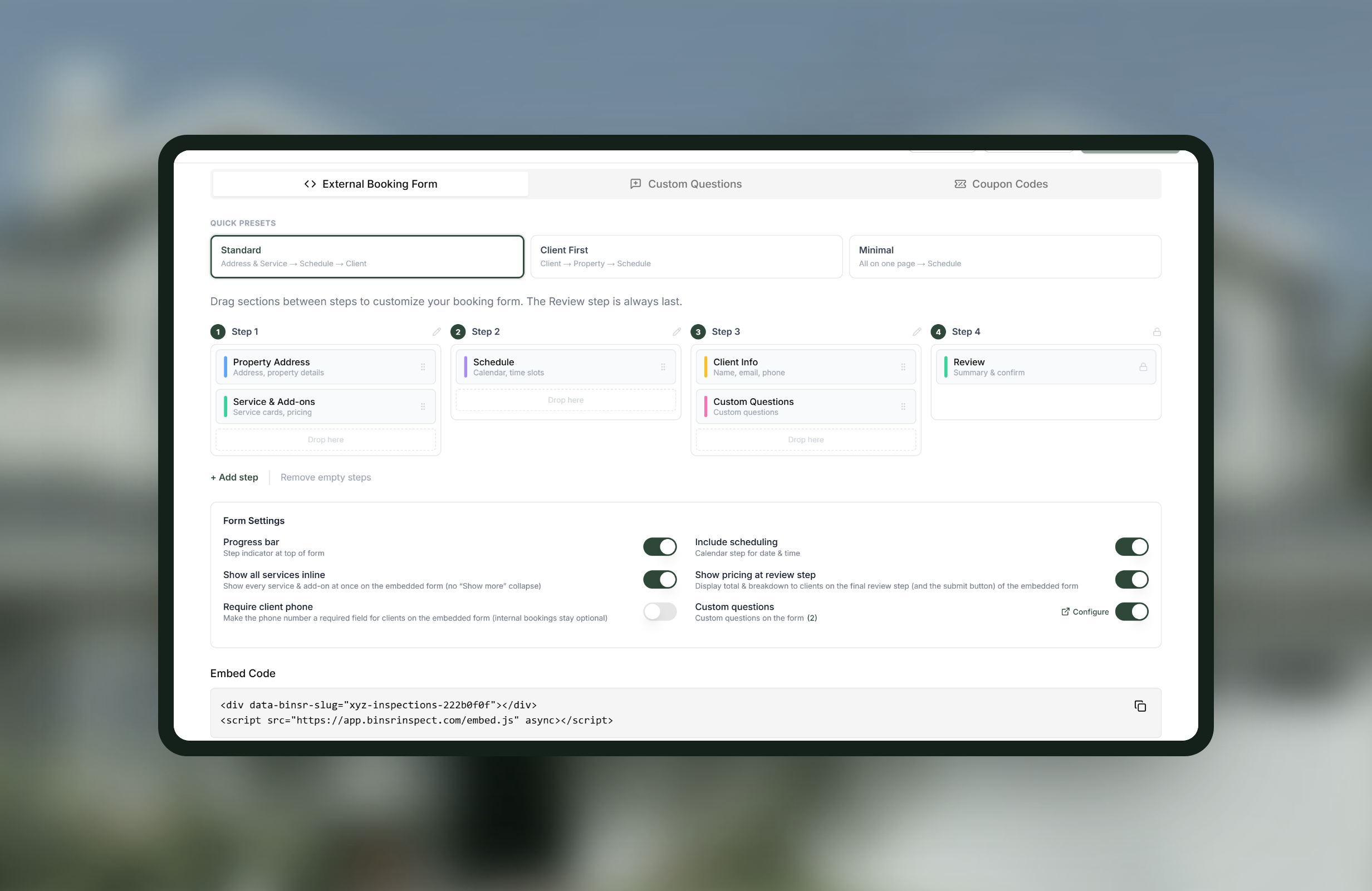
- Booking form for any website (Wix, Squarespace, Canva)
- Zip and county pricing, coupon codes, add-on time adjustments
- Stripe payments, invoice notes and sequential invoice numbers
- Booking surfaces
- A public booking page, an embeddable form for your own site, and an internal form for booking jobs yourself
- If your site will not take an embed
- Link to the standalone booking page instead
- Pricing modifiers
- Square footage, year built, and any custom question or field you add
- Square footage
- Pulled from Zillow automatically, and correctable if it is wrong
- Pricing shapes
- Fixed, per unit, banded ranges, or a flat fee plus a per-unit rate. Nearly any pricing you already run
- Test it first
- A calculator, so you can check what a given property would be quoted
- Behind-the-scenes calculation
- Zip code and county rates apply from the address, with no extra question put to the client
- Duration
- Pricing rules also contribute hours, or set one base time per service and skip it
- Coupon codes
- Detailed, added by you internally or used by clients and agents, so you can run promotions as you think of them
- Payments
- Stripe Connect, card and ACH, paid into your own Stripe account
- Recorded manually
- Cash, Check, Venmo, Cash App, PayPal, Zelle, wire and bank transfer, with QR codes clients can scan
- Part payments
- Partial payments, balances and mixed methods on one inspection
- Calendar
- Two-way Google Calendar sync
How Booking & Payments works
-
1
Set up your services and add-ons
Pricing attaches to the things you sell, so the services come first.
-
2
Add the rules that change the price
Square footage, year built, a pool, a crawlspace, or any custom question you ask. Square footage comes from Zillow on its own, and you can correct it.
-
3
Check it with the calculator
Run a property through before a client ever sees the form, so you know what it would quote.
-
4
Let location price itself
Zip code and county rates apply from the address behind the scenes, so a client further out pays the right amount without being asked an extra question.
-
5
Put the form where clients already are
Embed it in your own website, use the public booking page, or link the standalone page if your site will not take an embed.
-
6
Take the money
Stripe Connect pays into your own account. Cash, Check and the apps are recorded against the inspection, with QR codes to make paying easy.
Worth knowing
Price and duration come from the same rules
A pricing rule can also contribute hours, so a bigger property blocks out more time. If you would rather keep it simple, set one base duration per service and skip it.
Your Stripe account, not ours
Money goes directly to you and Stripe handles it. Binsr does not store financial data.
Coupons are yours to run
Add codes internally, or let clients and agents enter them, and run whatever promotions you come up with. An expired or inapplicable code is rejected at the form rather than discovered on the invoice.
Booking & Payments, answered
Can I put the booking form on my existing website?
Yes. It embeds into any site that takes code, including Wix, Squarespace and Canva, and if yours will not, you can link the standalone booking page instead.
Can I price by square footage?
Yes, and Binsr pulls the square footage from Zillow so the client does not have to type it. Correct it if it is wrong. You can also price on year built or any custom question you ask.
Can I charge more for certain areas without asking the client?
Yes. Zip code and county rates apply from the property address behind the scenes, with no extra question on the form.
Does the calendar know how long the job will take?
Yes. Pricing rules contribute hours as well as money, so a bigger property blocks out more time automatically. Or set one base duration per service.
Do I have to take card payments only?
No. Card and ACH run through your own Stripe account, and Cash, Check, Venmo, Zelle, PayPal and others are recorded against the inspection, with QR codes clients can scan.
Get started today
Better inspections are one click away.
Five free inspections. No time limit, no credit card.