Coverage & Service Areas
Book the right inspector for every address.
What is Coverage & Service Areas?
Set where each inspector works and your booking form only shows inspectors who actually serve that address.
- Distance limits and distance-based pricing per inspector
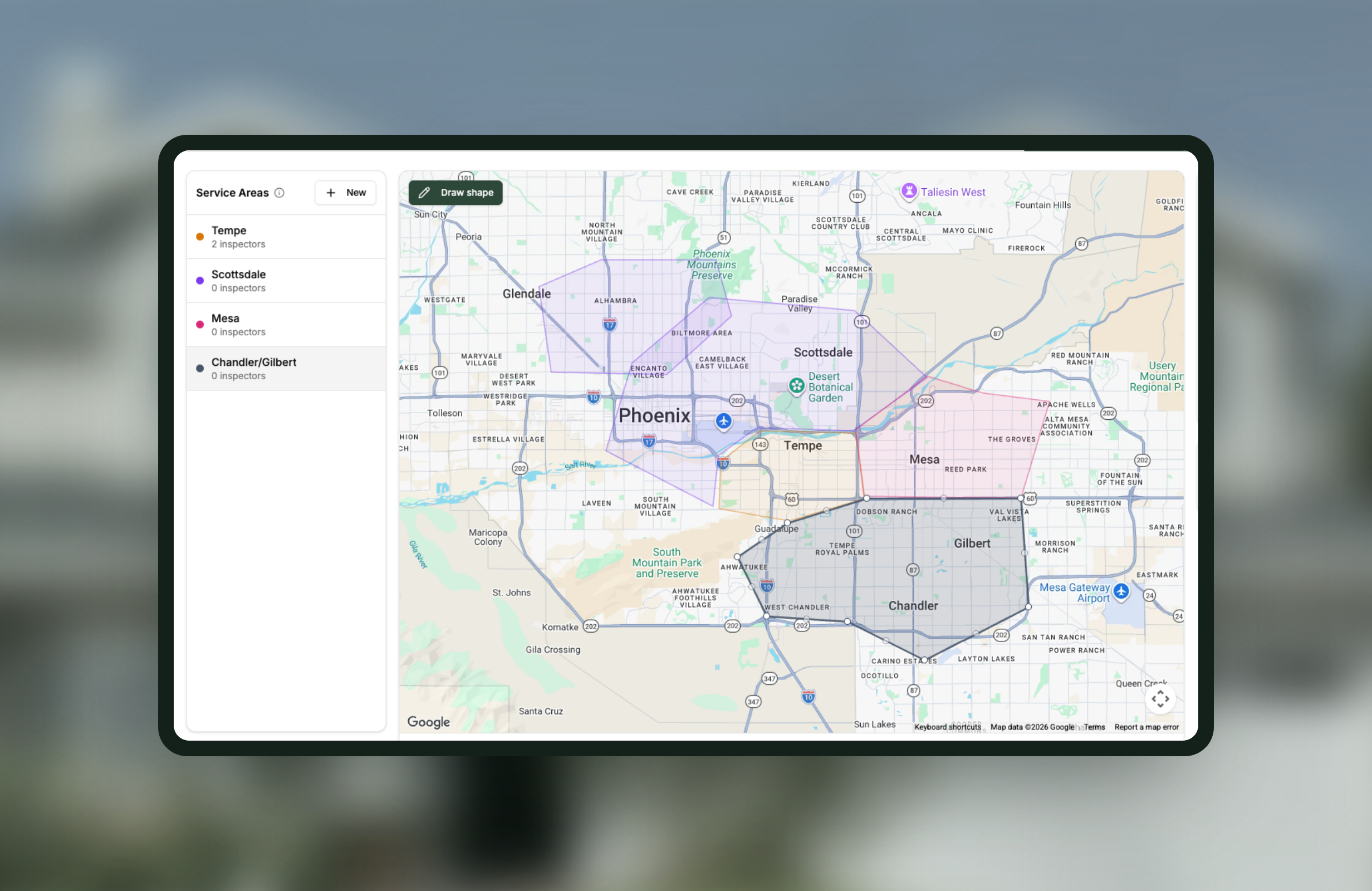
- Draw service areas right on the map
- Zip code and county-based pricing for services and add-ons
- Distance limits
- Per inspector, so each person has their own range
- Drawn areas
- Draw the coverage area on the map, including areas with holes in them
- Shared library
- Areas live in one account library and are assigned to inspectors, with one company default
- Checked at booking
- The booking form only offers inspectors who actually cover that address
- Distance pricing
- A fee that rises with the drive, set per inspector
- Location pricing
- Zip code and county rates for services and add-ons, applied without asking the client an extra question
- Test an address
- Type in a real property and see who would be offered, before a client ever sees the form
- Mileage
- Completed inspections are chained into daily drives and kept as a trip log
How Coverage & Service Areas works
-
1
Draw where you actually work
Draw the boundary on the map rather than describing it. An area can exclude a pocket inside it, which matters for rivers, ranges and county lines.
-
2
Give each inspector their ground
Areas are assigned per inspector, so a two-person team covering different halves of a metro is one setup rather than a compromise.
-
3
Price the drive
Distance-based pricing raises the fee as the journey gets longer, and zip code or county rates handle the places where distance is not the point.
-
4
Let the booking form enforce it
Clients are only offered inspectors who serve their address, so a job at the edge of your range either pays for the travel or never lands.
-
5
Check it against a real property
The address tester shows you who would be offered for a given address, which is far faster than finding the gap through a booking that never arrives.
Worth knowing
Per inspector is where the value is
A single company-wide radius works, but coverage set per inspector is what lets a team serve different ground without turning work away.
Test an address before you rely on it
Typing in a real property takes a moment and tells you exactly what a client would see.
Distance pricing is separate from the area
Drawing the area decides who is offered. Distance-based pricing decides what it costs. Either works on its own.
Coverage & Service Areas, answered
Can different inspectors cover different areas?
Yes. Distance limits and drawn service areas are set per inspector, so the booking form only offers the people who actually serve that address.
Can I charge more for a property further away?
Yes. Distance-based pricing adds to the fee as the drive gets longer, so jobs at the edge of your range pay for the travel.
How do I know my rules are right?
Test an address. Type in a real property and Binsr tells you which inspectors would be offered, before a client ever sees the form.
Can I price by zip code rather than distance?
Yes. Zip code and county pricing sets a different rate for a service or add-on based on where the property is.
What happens if nobody covers an address?
The booking form does not offer a slot, which is the point. You find out at the form rather than on the morning of the inspection.
Get started today
Better inspections are one click away.
Five free inspections. No time limit, no credit card.